I’m thrilled to announce MindVista 0.6 — a release dedicated to refining the AI-driven workflow, introducing richer node semantics, and delivering a host of UI and navigation improvements to make managing large mind maps even smoother.
Here is what’s new in 0.6.
Live AI Agent Feedback & Control
Working with AI agents is now more transparent and reliable. When an AI agent is active on a node, MindVista displays a busy overlay (a robot icon) directly on the node, replacing its status icon.
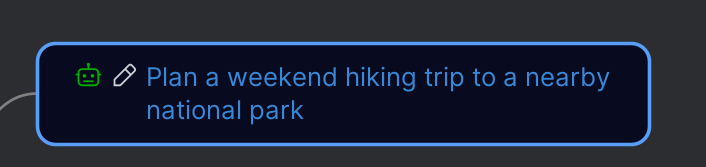
To prevent conflicts, the “Resolve” and “Break down” actions are automatically disabled for nodes with a running agent. Furthermore, every agent session now gets a Stop button and an Open Instructions File button in its dedicated console tab, giving you more control over the process.
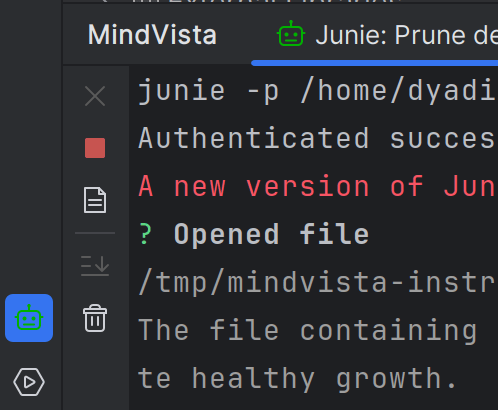
You may have noticed that there is also a separate tool window for running agents.
Parallel Sessions & Safe Merging
MindVista 0.6 introduces a more robust way to handle multiple AI agent sessions simultaneously. Every session now operates on a private working copy of the mind map. When a session completes, its changes are safely merged back into the original map.
If you launch multiple agents in parallel, MindVista ensures their results are merged in the order they finish, preventing data loss and keeping your map consistent.
Richer Semantics: The Requirement Node
I’ve introduced a new node type: Requirement. Use Requirement nodes to specify constraints, rules, or specific instructions that the AI agent MUST follow when resolving a task.
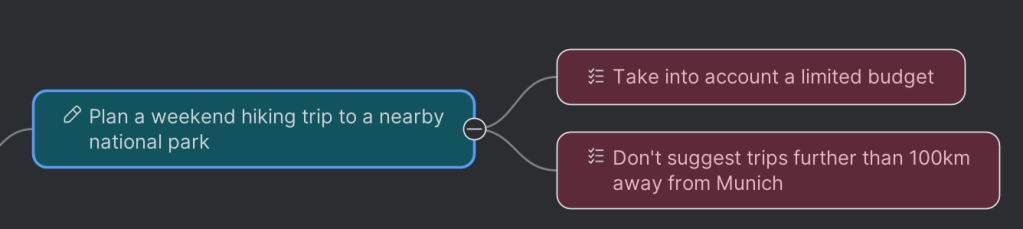
Requirements are collected automatically from the parent chain and presented to the agent in a dedicated section, ensuring that your high-level project rules are always respected during task implementation.
Unique Node IDs (mid) and Map Format 1.2
To support advanced merging and cross-referencing, every node in MindVista now carries a unique map-wide ID (mid). The map file format has been bumped to 1.2 to accommodate these identifiers.
MindVista automatically assigns these IDs when you create new nodes or load older maps, so you don’t have to worry about them. This change lays the groundwork for even more powerful synchronization features in future releases.
UI and Navigation Polish
Version 0.6 brings numerous small but impactful improvements to the user experience:
- Keyboard Shortcut Discoverability: Hints for common actions like Edit, Delete, and Status change are now shown directly in the context menu.
- Status Changes: Marking a parent node as Resolved no longer overrides the individual statuses of its children, preserving the state of your sub-tasks.
- Fresh Iconography: New monochrome icons for Projects, Notes, Requirements, and the “In Progress” status provide a cleaner, more consistent look.
- Outcome Notifications: Balloon notifications now alert you when an agent session finishes, fails, or is cancelled, even if the IDE is in the background.
Upgrade
Update to MindVista 0.6 via Settings | Plugins in your IDE. Your existing maps will be automatically upgraded to version 1.2 upon their first save.
I’m constantly working to make MindVista a special tool for AI-assisted brainstorming and project management. As always, your feedback is invaluable — please share your thoughts and report any issues on MindVista tracker!


