I am happy to introduce MindVista 0.7, a release focused on giving you more control over how you interact with AI agents. This version brings deeper customization for AI tools, interactive session support, and improved diagnostic feedback.
Here is what is new in 0.7.
Specialized Breakdown Agents
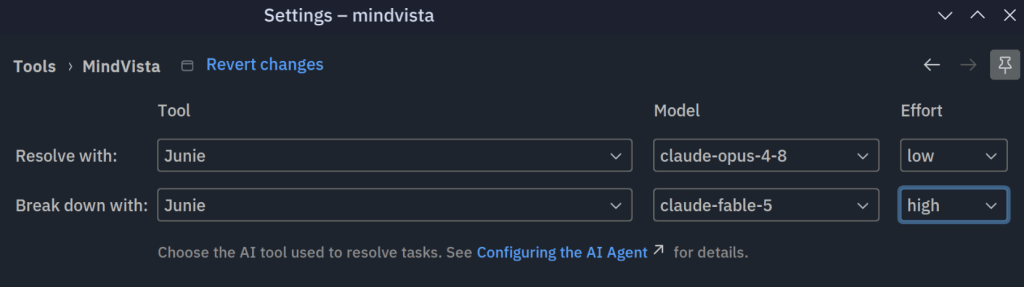
I have decoupled the “Break down” and “Resolve” actions, allowing you to choose a separate AI agent for task decomposition. This flexibility enables you to use one model for high-level planning and another for detailed implementation, optimizing for both cost and quality.
Model and Effort Customization
You can now fine-tune your AI agent’s performance directly within MindVista. I have added model and effort selection dropdowns to both the global settings and the ad-hoc prompt dialog. This allows you to choose the most appropriate model for each task and adjust the reasoning effort when supported by the agent (currently only Junie).
To provide better context, the “Resolve with…” and “Break down with…” context menu items now display the name of the currently selected model in parentheses.
Interactive Agent Sessions
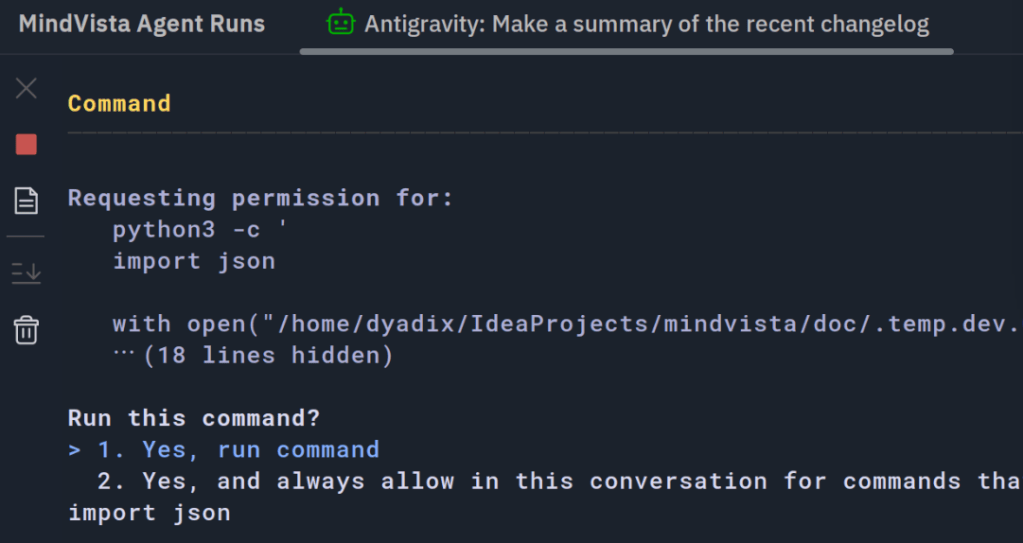
Communication is now a two-way street. Agent sessions now run in an interactive terminal, allowing you to provide input and reply to the agent directly during a session if needed. This makes it much easier to guide the agent or clarify requirements without having to restart the entire process.
Enhanced Reliability and Diagnostics
MindVista 0.7 is more helpful when things go wrong. If a selected AI tool fails to start, you will now receive a balloon notification with a direct shortcut to the MindVista settings, helping you resolve configuration issues instantly.


